
Use an operator’s network
No gateways or network server of your own.
- No infrastructure of your own
- Coverage depends on the build-out at the meter location
- Usually a monthly fee per device or per message
- Network quality is up to the operator
LORABOX
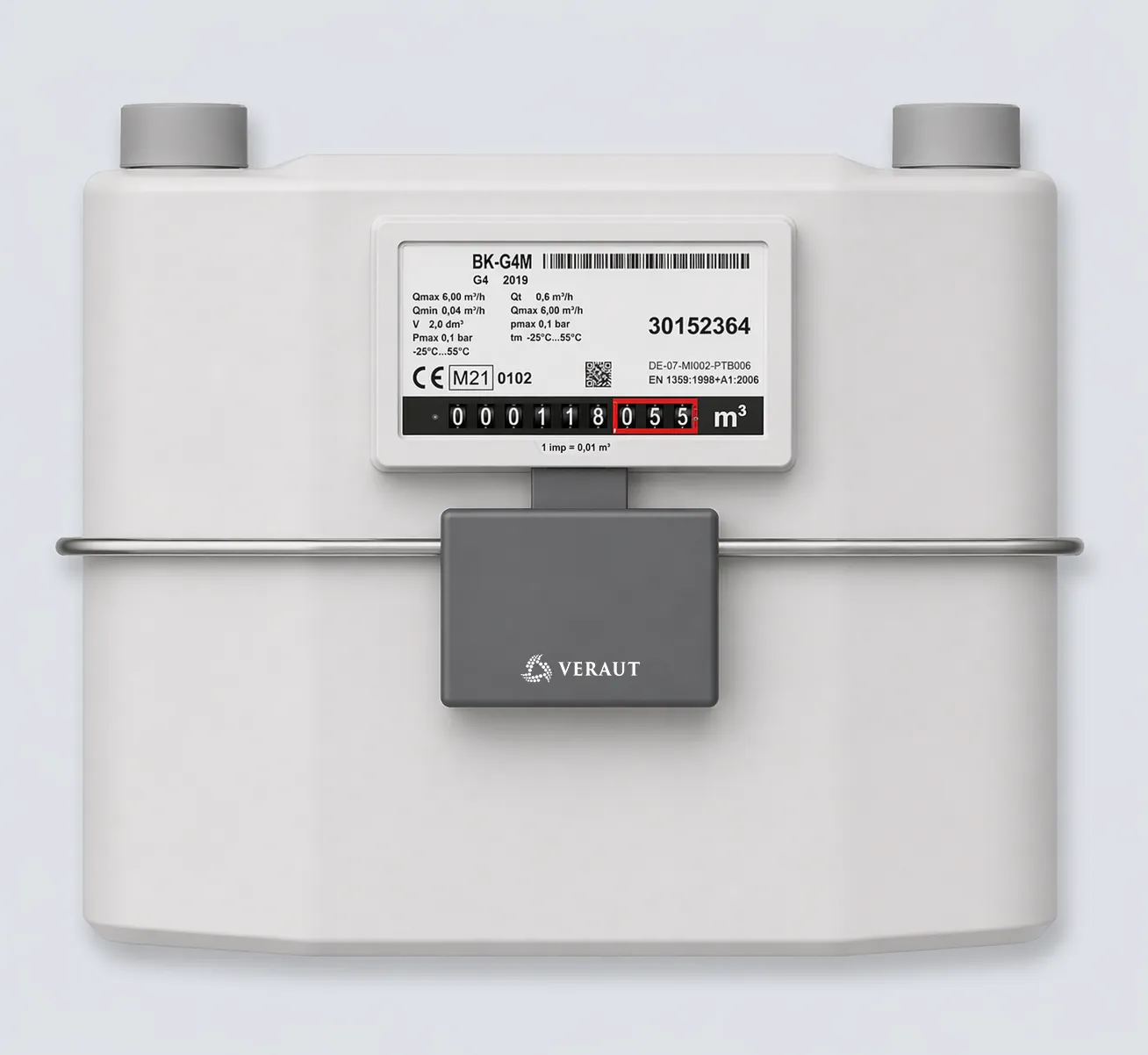
The LORABOX is a battery-powered radio module for retrofitting diaphragm gas meters that have a pulse output.
The module is fitted onto the meter’s pulse output with an adapter, records the pulses via a reed or magnetic contact and transmits the meter reading in parallel over LoRaWAN and Wireless M-Bus (mode T1, OMS).
Set-up is done via Bluetooth with the VERAUT app; housing and seal remain untouched. The data is passed to VERILOG or an existing system.
 1234
The LORABOX is fitted directly onto the index of a diaphragm gas meter with an adapter. No meter replacement and no work on the gas path is required.
Battery-powered radio module with one shared antenna for LoRaWAN and Wireless M-Bus, IP65.
Pulses are picked up via a reed or magnetic contact and converted into the meter reading using the configured pulse value.
The meter-specific adapter connects the module to the meter. Available for the Elster BK-G4M, other meter types on request.
Alert on external magnetic field, removal from the meter and low battery status.
Many diaphragm gas meters in homes and businesses already have a pulse output. That makes them readable remotely without replacing the meter. Yet in many places they are still read on site, or there is only a single radio path that leaves gaps when it fails.
The LORABOX counts the meter pulses, converts them into the meter reading using the configured pulse value and sends it over two independent paths at the same time.
Hourly by default; the transmission interval is freely adjustable.
Where LoRaWAN is missing or down, field staff collect the same readings while passing by.
If a gateway fails, the LORABOX stores the readings and resends them automatically once the connection is back.
Remote reading, walk-by or a mix of both: you stock and install a single module and do not have to commit to one radio standard in advance.
For remote reading, a LoRaWAN gateway must be within reach of the meter location. Three approaches are common. Which one fits depends on coverage and cost in your area.
No gateways or network server of your own.
Your own gateways and network server. Even widely spread metering points in rural networks can be covered with a few gateways.
LoRaWAN for remote reading, wM-Bus as a fallback for reading on site.
Diaphragm gas meters are often installed in basements and service rooms. In practice, this calls for gateways roughly 500 to 1,000 m apart, and every gateway site needs power and a backhaul connection. We support you with coverage analysis and cost calculation.
Once the network is settled, installation takes four steps.
The adapter fits the module to the meter type. It is available for the Elster BK-G4M; other meter types on request.
The LORABOX goes straight onto the pulse output. No meter replacement, no work on the gas line, no interruption of supply.
Enter the values in the VERAUT app for Android or Windows. The housing stays closed and the seal untouched.
The app shows the diagnostics. The first transmission arrives in VERILOG or your system within a few minutes.
Tell us your meter types, quantities and network model. We will work out adapters and the connection to your system with you.
Phone +43 732 386361-0On the meter side, the LORABOX only needs the pulse output. On the system side, it delivers to VERILOG or to your own network server.
Guide value with hourly transmission. A 3.6 V lithium thionyl chloride cell powers the module. Transmission interval and temperature at the installation site affect runtime.
With hourly transmission, a battery change is usually not needed within the normal service cycle. The module reports its battery status with every transmission.
| LoRaWAN | Specification 1.0.4, EU868 band |
|---|---|
| Activation | OTAA and ABP |
| Wireless M-Bus | Mode T1 to EN 13757-4, OMS profile 4.5.1 |
| Frequency | 868 MHz for LoRa and wM-Bus, shared antenna |
| Airtime | 1 % duty cycle in the 868 MHz band is observed |
| Configuration | Bluetooth LE 6.0, VERAUT app for Android and Windows |
| Remote maintenance | Remote configuration and firmware updates |
| Input | 1 × digital for reed or magnetic contact |
|---|---|
| Pulse value | Configurable, pulse to meter value |
| Meter data | Meter reading, meter number and meter size |
| Meter types | Diaphragm gas meters with pulse output |
| Adapter | Elster BK-G4M; others on request |
| Transmission interval | Freely adjustable, hourly by default |
|---|---|
| Data buffer | Local storage, automatic resend after gateway outage |
| Alarms | Tampering by magnetic field, removal from the meter, battery status |
| Transmission | Alarms and status in the uplink |
| LoRaWAN | AES-128 end-to-end encryption |
|---|---|
| Wireless M-Bus | Payload encrypted to OMS |
| Bluetooth | Pairing and authentication during configuration |
| VERILOG | Servers of VERAUT GmbH in Linz, Austria; network server depends on the network model |
| Battery | Li-SOCl₂, 3.6 V |
|---|---|
| Battery life | Over 15 years with hourly transmission (guide value) |
| Operating temperature | −25 to +55 °C |
| Protection class | IP65 |
| Explosion protection | Ex II 3G Ex ic IIB T4 Gc (Zone 2) |
| Backend | VERILOG web portal |
|---|---|
| Interfaces | MQTT, REST and webhook |
| Data format | JSON or binary |
| Network server | Public or private |
| Installation | Directly onto the pulse output, no work on the gas line |
Wherever gas can escape, strict rules apply to electrical equipment. ATEX is the European regulation for this and classifies areas by how often an explosive gas-air mixture can occur. The LORABOX is approved for Zone 2:
An explosive mixture is not likely to occur in normal operation, or only briefly.
Dust-tight and protected against water jets.
For use in hazardous areas, the certificate and the operating instructions apply.
The LORABOX is designed for three fields of use. You will find more examples of VERAUT remote reading on the practice page.
Diaphragm gas meters in residential and commercial buildings deliver hourly readings without anyone going down to the basement.
At transfer stations and metering points in Zone 2 hazardous areas.
Meters already in place become remotely readable with an adapter, which saves replacing them.
See practice examplesFor remote reading to the office, yes. Without LoRaWAN coverage, the readings can be collected over Wireless M-Bus by walk-by or drive-by.
LoRaWAN uses AES-128 end-to-end encryption, and the wM-Bus payload is encrypted to OMS. Setup via Bluetooth requires pairing and authentication.
Yes. Configuration and firmware can also be changed remotely. On site, Bluetooth remains available.
Yes, the LORABOX is available now.
Both read meters via the pulse output. The LORABOX fits if you use a LoRaWAN network or need walk-by. The NB IoT Box LITE transmits over the mobile operators’ NB-IoT network without a gateway of your own and also reads encoder registers.
A pilot with a manageable number of meters shows how coverage and data flow work in your area. We set it up with you and review the results together.
Briefly describe your application, meter type, installation site and hazardous area zone. We reply within up to three working days.
VERAUT GmbH · Derfflingerstraße 14/C/3 · 4020 Linz, Austria
+43 732 386361-0 · info (at) veraut.com